
Microsoft Surface Laptop 8 Review: Faster Performance, Outstanding Battery Life, But at a Higher Cost
Microsoft has introduced the new Surface Laptop 8 for consumers, bringing improved performance, impressive battery life, and the latest Qualcomm ARM processors. While the new model delivers meaningful refinements, buyers will immediately notice one major change—the price. Due to rising memory and chip costs, the starting price has increased significantly compared to last year’s model.
The Surface Laptop 8 replaces the seventh-generation Surface Laptop released in 2024, Microsoft’s first ARM-powered laptop built around Qualcomm’s Snapdragon processors to compete directly with lightweight premium devices such as Apple’s MacBook Air.
Familiar Premium Design
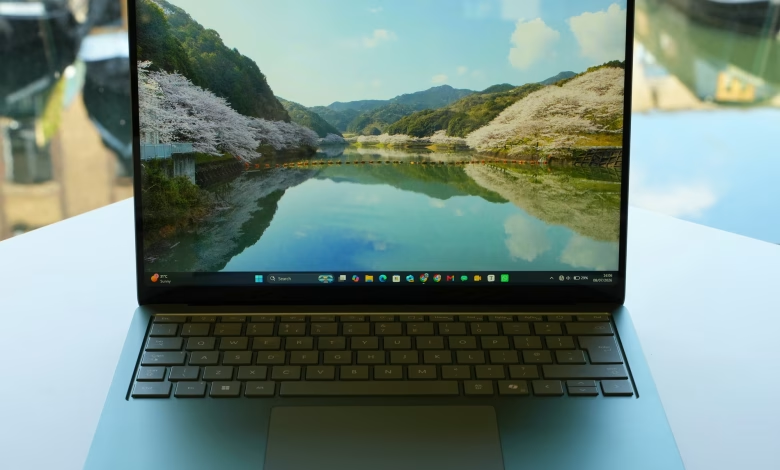
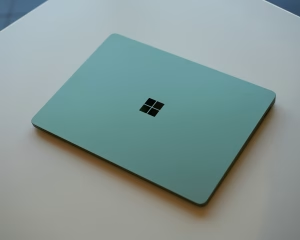
At first glance, the Surface Laptop 8 looks almost identical to its predecessor. Apart from a few new colour options—including an attractive jade green finish—the design remains largely unchanged.
It features a premium aluminium chassis, an excellent keyboard, and a sharp 120Hz LCD touchscreen available in 13.8-inch and 15-inch variants. The review model was the smaller 13.8-inch version.
Microsoft has also introduced support for Windows 11’s new Haptic Signals feature. Using the responsive haptic touchpad, users receive subtle tactile feedback when interacting with interface elements such as hovering over the close button or snapping windows, making Windows feel more responsive and interactive.
The display delivers vibrant colours, HDR support, and Dolby Vision compatibility. However, its glossy finish can reflect overhead lighting, making glare noticeable in bright environments.
Audio quality is equally impressive. Although the speakers lack deep bass, they remain clear, balanced, and loud enough for everyday media consumption.

Specifications
- Display: 13.8-inch LCD (2304 × 1536 resolution, 201 PPI, 120Hz)
- Processor: Qualcomm Snapdragon X2 Plus (10-core) or Snapdragon X2 Elite (12-core)
- Memory: 16GB, 24GB, or 32GB RAM
- Storage: 256GB, 512GB, 1TB, or 2TB SSD
- Operating System: Windows 11 Home
- Camera: 1080p front-facing webcam
- Connectivity: Wi-Fi 7, Bluetooth 5.4, USB-A, two USB4/USB-C ports, Surface Connect, 3.5mm headphone jack
- Dimensions: 301 × 220 × 17.5 mm
- Weight: 1.36 kg
Performance
Customers can choose between Qualcomm’s new Snapdragon X2 Plus and the more powerful Snapdragon X2 Elite processors. Microsoft also offers Intel-powered versions aimed primarily at business users.
The Snapdragon X2 Elite provides approximately 16–20% better single-core performance and around 10% stronger graphics performance than the previous generation. While the gains are noticeable, they are not dramatic.
In everyday use, the Surface Laptop 8 feels extremely responsive and comfortably handles productivity tasks, web browsing, content creation, and even light gaming. However, Apple’s latest M5-powered MacBook Air still maintains an overall performance advantage.
One of the biggest strengths of Qualcomm’s ARM processor is efficiency. The laptop remains quiet throughout most workloads, with cooling fans only becoming audible during intensive tasks—a significant advantage over Intel-powered models, which tend to run hotter.
Battery Life
Battery performance remains one of the Surface Laptop 8’s strongest selling points.
During testing, the laptop delivered almost 14 hours of continuous productivity work involving more than 15 Chrome tabs, Evernote, messaging applications, text editing, and several hours of photo editing in Affinity.
For many users, that translates to nearly two days of moderate usage or a full working day of heavier workloads without needing to recharge, placing it among the best-performing Windows laptops for battery life.
Ports and Connectivity
The Surface Laptop 8 includes:
- Two USB-C (USB4) ports
- One USB-A port
- 3.5mm headphone jack
- Surface Connect charging port
However, Microsoft no longer includes a Surface charger in UK and EU retail packages. As a result, the proprietary Surface Connect port offers limited value unless users purchase Microsoft’s optional £80 charger or compatible docking accessories.
Windows 11 on ARM
The laptop ships with Windows 11 for ARM, providing a clean installation without the trial software commonly found on many Windows PCs.
Microsoft has integrated several AI-powered features, although many offer limited practical value. One standout addition is Click to Do, which allows users to hold the Windows key and click anywhere on the screen to instantly copy text, extract images, search online, or access AI-powered actions.
Application compatibility has improved considerably compared to earlier ARM-based Windows devices.
Most software now runs either as native ARM applications or through Microsoft’s Prism emulation technology, which enables traditional x64 applications designed for Intel and AMD processors to operate seamlessly.
Some emulated programs, including Evernote, may run slightly slower than their native counterparts. Gaming compatibility has also improved significantly. While some multiplayer games using anti-cheat software may still encounter issues, recent updates now support popular titles like Fortnite, making ARM gaming increasingly viable.
Sustainability and Repairability
Microsoft has designed the Surface Laptop 8 with repairability and sustainability in mind.
The SSD can be replaced, official service documentation is available, and battery protection features such as Adaptive Charging and Battery Capacity Limits help extend battery lifespan.
The laptop also incorporates recycled materials, including aluminium, cobalt, copper, gold, tin, and rare-earth metals. Microsoft continues to support trade-in, recycling, environmental reporting, and transparent out-of-warranty repair pricing.
Pricing
The 13.8-inch Surface Laptop 8 starts at £1,449 with the Snapdragon X2 Plus processor, 16GB RAM, and 512GB SSD.
Models equipped with the Snapdragon X2 Elite begin at £1,549.
This represents a substantial increase over the previous generation, largely attributed to rising global memory and semiconductor prices.
Final Verdict
The Surface Laptop 8 continues Microsoft’s tradition of producing some of the finest premium Windows laptops available.
Although the overall design remains familiar, the combination of excellent battery life, efficient Snapdragon processors, a high-quality display, comfortable keyboard, responsive haptic touchpad, and quiet operation makes it an outstanding everyday laptop.
Windows on ARM has matured significantly, reducing compatibility concerns for most users and offering a smooth, uncluttered Windows experience. New features such as Haptic Signals add a level of refinement rarely found on competing Windows devices.
The biggest drawback is the price. The impact of rising RAM and chip costs has pushed the Surface Laptop 8 into a much higher price bracket, making it considerably more expensive than its predecessor.
Even so, for buyers looking for a premium Windows laptop with exceptional battery life, solid performance, and polished hardware, the Surface Laptop 8 remains one of the strongest options currently available.
Pros
- Excellent battery life
- Strong everyday performance
- Bright, high-quality 120Hz display
- Premium keyboard and haptic touchpad
- Useful Windows 11 Haptic Signals feature
- Good speakers, microphones, and webcam
- Fast Windows Hello facial recognition
Cons
- Considerably more expensive than the previous model
- Limited port selection
- Modest performance improvement over the last generation
- Some Windows on ARM software compatibility limitations remain
- Surface Connect port is less useful without purchasing Microsoft’s optional charger or dock


